JS actions
Use JavaScript to orchestrate several actions in one run, inside a restricted sandbox, with a whitelist of callable actions and cycle detection at publish time.
A JS action is an action written in JavaScript. A JS action does not connect to any database. It calls other actions with executeAction(slug, params), combines their results and returns them. Use a JS action when a task has several steps, for example fetching data from two actions and joining it, or running a series of write actions in order.
Required roles
Section titled “Required roles”- Editor and above: create, edit and publish JS actions.
- Admin: allow a JS action to call a restricted action (the whitelist, described below).
Create a JS action
Section titled “Create a JS action”- Go to Build > Actions and click New action.
- Enter a Name and Slug, set Kind to JavaScript (no data source is needed) and select the Mode. Select Writes data if the JS action calls write actions, so that users confirm before running it.
- Click Create, then write the code in the Definition tab. Type
executeAction("and the editor suggests the actions you can call. - Declare the JS action’s own params in the Params section, as for a SQL action. The code reads them from
ctx.params. - Click Save draft, then click Publish.
Write the code
Section titled “Write the code”The code must export default a function that takes ctx and returns a result:
export default (ctx) => {  const orders = executeAction('orders-by-status', { status: ctx.params.status });  const customers = executeAction('list-customers');
  const emailById = {};  customers.forEach((c) => {    emailById[c.id] = c.email;  });
return orders.map((o) => ({ id: o.id, total: o.total, customer_email: emailById[o.customer_id] || null, }));};ctxcontainscurrentUser(theidandemailof the user running it),environment(id,slug,isProduction),params(the JS action’s own params) andvars(the environment’s variables).executeAction(slug, params)returns the array of rows from the called action. If the child action fails,executeActionthrows an error, which you can catch withtry/catch.- If the function returns an array of objects, the Run action page displays a table. If it returns a single value, the page displays one line.
- Two calls to the same action with the same params in one run execute only once and share the result.
Sandbox and limits
Section titled “Sandbox and limits”JS actions run in a server-side QuickJS sandbox:
- There is no
fetch,require, file system or network access.executeActionis the only way to reach external data. - A run can make at most 50
executeActioncalls. - JS actions that call JS actions can nest at most 3 levels deep.
- Each run is limited to 30 seconds and 128 MB of memory.
- Each child action commits on its own. No transaction spans the whole chain: if a later step fails, data written by earlier steps remains. Use
try/catchto call a compensating action when needed. - JS actions cannot run in the background yet: they cannot be queued, bulk-run or scheduled.
Permissions for child actions
Section titled “Permissions for child actions”Each executeAction call goes through the full permission checks of the child action, using the permissions of the user running the JS action. Publishing a JS action grants no additional permissions: if the user running it is not allowed to run a child action, that call is refused.
Whitelist: allow a JS action to call a restricted action
Section titled “Whitelist: allow a JS action to call a restricted action”A common setup is to keep the child action restricted and allow only the JS action to call it. Users can then use the child action only through the JS action.
- Open the child action, then the Settings & access tab and the Action permissions card (Admin role required).
- Switch Permission mode to
restricted — only those grantedand confirm. - Under Grant run access to, select the JS action type, select the JS action in Pick a JS action…, then click Grant.
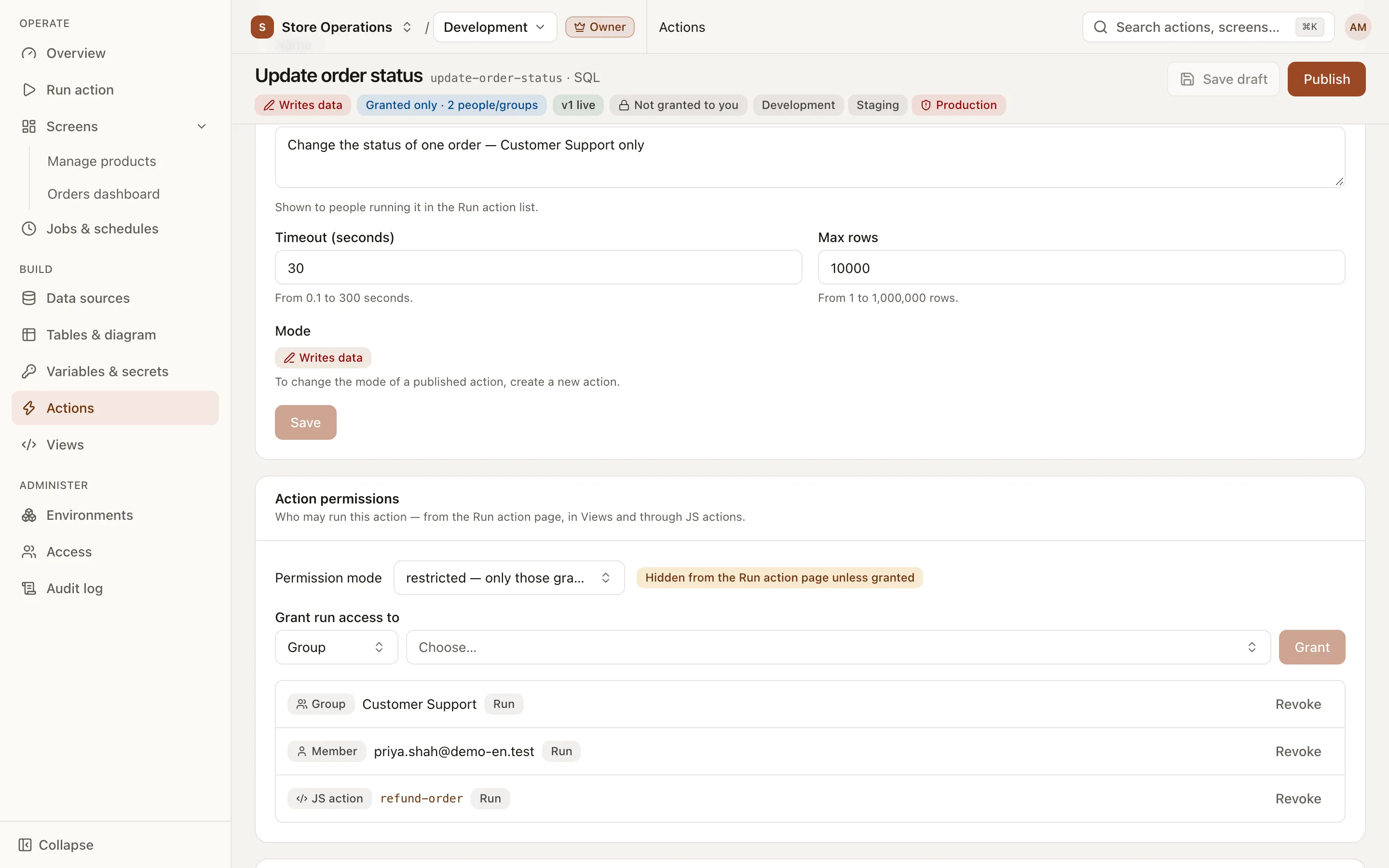
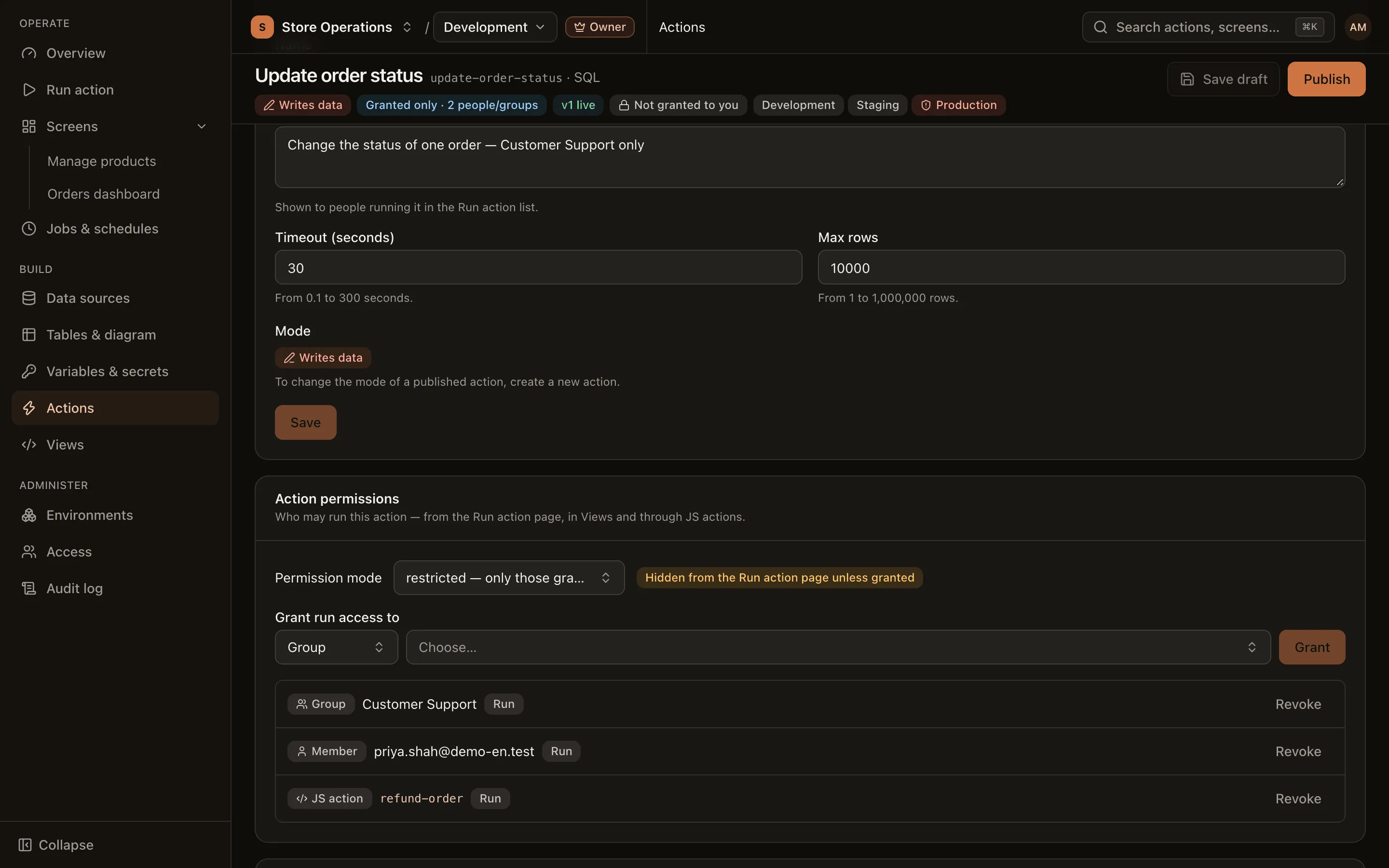
A grant to a JS action takes effect only while the child action is restricted. The JS action can then call the child action with the permissions of the user running the JS action, and users do not see the child action on the Run action page unless they are granted access separately.
Editors still see every action in the editor’s suggestions, including restricted actions. An action that appears in the suggestions is not necessarily callable: the call succeeds only after an admin has added the JS action to that action’s grant list.
Publish checks
Section titled “Publish checks”- The slug in
executeActionmust be a fixed string, for exampleexecuteAction('list-customers'). A slug built at run time (executeAction(name)) is refused, because publishing builds the dependency graph from the code itself. - Every called action must exist in the project.
- Cycles are not allowed: if A calls B and B calls A (directly or indirectly), publishing is refused and the page shows the path, for example
a → b → a.
After publishing, an action that a JS action calls cannot be deleted until that call is removed from the JS action.